1.6.1.2
2.2 and up
Productivity
What’s new in v1.6:
* NEW: Quick Add – add tasks from notification center
* NEW: Dropbox Sync (syncing with multiple Android, iOS and Mac OS X devices)
v1.5:
* NEW: Background, unobtrusive sync
* NEW: Background auto sync every 30 min / 1 hour
* NEW: Search presets button added to the search bar
* NEW: Faster Toodledo Sync.
* NEW: Old themes refreshed to follow Jellybean guidelines
http://www.facebook.com/The2DoApp
http://www.twitter.com/2DoHelp
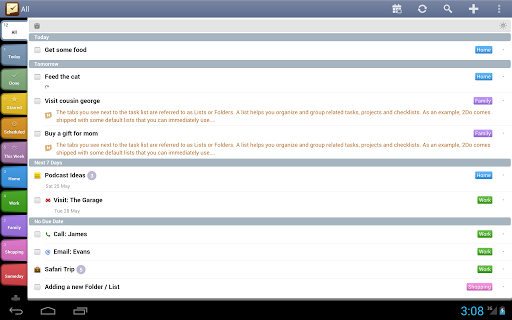
From a simple checklist to full-blown project management, 2Do is an incredibly powerful, award winning, task manager that lets you focus on what’s important. Zero complication. Zero frustration. Just a stunning to do list you can finally understand and use. With 2Do you get:
★ Sync tasks over-the-air on multiple devices running 2Do (including iOS, OS X) using Dropbox or Toodledo. Dropbox sync supports syncing all data, including Smart Lists, across Android, iOS and OS X devices.
★ Projects, Checklists or a simple To do list
★ Repeating tasks with end dates
★ Tabbed Lists for easy organization and grouping
★ Landscape Calendar view with date markers and date-filtering
★ Quick Add: Create tasks directly from the notification area, or glance at the number of tasks due Today.
★ Widgets that allow you to mark tasks done directly from the home screen. NOTE: Widget will not work if the app is moved to the SD Card.
★ Hide or re-arrange lists
★ Password Protection: Lock all your tasks or individually picked Lists
★ Drag & Drop tasks from and to Lists
★ Smart Lists: Dynamic lists based on saved searches with an optional dynamic date range
★ Powerful date range searching and filtering
★ Easy sorting by dates, lists, priority, status, title or manual sorting
★ Scheduling of tasks using Start Date & Time
★ Tags: create keyword tags; search for tags or attach contacts as people tags
★ Alarms: Easily create multiple alarms per task
★ Attach Photos to your tasks using the Camera or the Gallery
★ Instant Previews: Preview and edit notes or attached pictures from the main list with a single tap
★ Focus: Quick toggle between your tasks and a refined ’focus’ list from any view
★ Actions: attach contacts or other ’action’ information to tasks
★ Starred Tasks
★ Batch Operations: Edit, Delete, Move, Tag, Share and more
★ Multiple Themes: Graphite, Black, Pink
★ Samsung S Pen ® drawing support in Notes. Draw using a finger or a stylus on devices such as Galaxy Note, Galaxy Nexus.
★ Share tasks
★ Optimized for an unlimited number of tabbed lists with hundreds of tasks per list
★ Backup & Restore: Create easy backups of your database or restore from an existing one at any time
★ Background automatic sync at specified intervals
★ Flexible task manager: Use GTD (Getting Things Done) principals, Franklin Covey or your very own
★ Much, much more.
Please kindly contact us in case you have any issues. We’d love yo help.
NOTE:
Google Sync: This cannot be supported till Google Task API supports meta-data (required by 2Do), which in its current state does not.
Follow us on Facebook:
http://www.facebook.com/The2DoApp
Dedicated 2Do Help/Tips Feed:
http://www.twitter.com/2DoHelp

 Download 2Do: To do List | Task List 1.6.1.2
Item Reviewed: 2Do: To do List | Task List 1.6.1.2
Description: APK ANDROID DOWNLOAD. The best and most popular apps on our smartphones with android downloads in one place.
Rating: 4.5
Reviewed By: APK Android DOWNLOAD
2.2 and up
Productivity
What’s new in v1.6:
* NEW: Quick Add – add tasks from notification center
* NEW: Dropbox Sync (syncing with multiple Android, iOS and Mac OS X devices)
v1.5:
* NEW: Background, unobtrusive sync
* NEW: Background auto sync every 30 min / 1 hour
* NEW: Search presets button added to the search bar
* NEW: Faster Toodledo Sync.
* NEW: Old themes refreshed to follow Jellybean guidelines
http://www.facebook.com/The2DoApp
http://www.twitter.com/2DoHelp
From a simple checklist to full-blown project management, 2Do is an incredibly powerful, award winning, task manager that lets you focus on what’s important. Zero complication. Zero frustration. Just a stunning to do list you can finally understand and use. With 2Do you get:
★ Sync tasks over-the-air on multiple devices running 2Do (including iOS, OS X) using Dropbox or Toodledo. Dropbox sync supports syncing all data, including Smart Lists, across Android, iOS and OS X devices.
★ Projects, Checklists or a simple To do list
★ Repeating tasks with end dates
★ Tabbed Lists for easy organization and grouping
★ Landscape Calendar view with date markers and date-filtering
★ Quick Add: Create tasks directly from the notification area, or glance at the number of tasks due Today.
★ Widgets that allow you to mark tasks done directly from the home screen. NOTE: Widget will not work if the app is moved to the SD Card.
★ Hide or re-arrange lists
★ Password Protection: Lock all your tasks or individually picked Lists
★ Drag & Drop tasks from and to Lists
★ Smart Lists: Dynamic lists based on saved searches with an optional dynamic date range
★ Powerful date range searching and filtering
★ Easy sorting by dates, lists, priority, status, title or manual sorting
★ Scheduling of tasks using Start Date & Time
★ Tags: create keyword tags; search for tags or attach contacts as people tags
★ Alarms: Easily create multiple alarms per task
★ Attach Photos to your tasks using the Camera or the Gallery
★ Instant Previews: Preview and edit notes or attached pictures from the main list with a single tap
★ Focus: Quick toggle between your tasks and a refined ’focus’ list from any view
★ Actions: attach contacts or other ’action’ information to tasks
★ Starred Tasks
★ Batch Operations: Edit, Delete, Move, Tag, Share and more
★ Multiple Themes: Graphite, Black, Pink
★ Samsung S Pen ® drawing support in Notes. Draw using a finger or a stylus on devices such as Galaxy Note, Galaxy Nexus.
★ Share tasks
★ Optimized for an unlimited number of tabbed lists with hundreds of tasks per list
★ Backup & Restore: Create easy backups of your database or restore from an existing one at any time
★ Background automatic sync at specified intervals
★ Flexible task manager: Use GTD (Getting Things Done) principals, Franklin Covey or your very own
★ Much, much more.
Please kindly contact us in case you have any issues. We’d love yo help.
NOTE:
Google Sync: This cannot be supported till Google Task API supports meta-data (required by 2Do), which in its current state does not.
Follow us on Facebook:
http://www.facebook.com/The2DoApp
Dedicated 2Do Help/Tips Feed:
http://www.twitter.com/2DoHelp
Download 2Do: To do List | Task List 1.6.1.2